Analytics
Framer Analytics in 2026: Funnels, A/B Testing, Click Tracking, and AI Insights
A 2026 guide to Framer Analytics, including funnels, A/B testing, click tracking, Agents, privacy limitations, and when to use other tools.
By
Alex Ran
·
15
min read
·
Last updated:
Key takeaways
Framer Analytics now covers many everyday B2B website questions, including traffic, CTA clicks, form submissions, funnels, and page-level A/B tests.
The Convert add-on is most useful for teams with clear conversion paths and enough traffic to support meaningful testing.
Framer 3.0 adds Agents and Branching, making it easier to explore performance data and develop website improvements before publishing them.
Framer tracks defined actions rather than visual behaviour. You may still need tools such as Hotjar for heatmaps and session recordings.
Its cookie-free measurement is useful for privacy, but it has limitations for long B2B buying journeys and multi-touch attribution.
Framer works best as a marketing-site analytics tool. GA4, Mixpanel, or Amplitude may still be needed for broader acquisition or product analytics.
Originally published September 2025 · Updated July 2026
Update note: This guide was first published after Framer introduced Advanced Analytics in 2025. It has been revised for Framer 3.0, including the current analytics setup, the Convert add-on, AI Agents, Branching, and the limitations B2B teams should understand before relying on Framer as their main analytics tool.
Framer’s native analytics can now answer many of the everyday questions a B2B marketing team has about its website.
Which pages bring in traffic? Are visitors clicking the main CTA? Where do people leave the demo journey? Does one landing-page version convert better than another?
Framer can track these behaviours, build funnels, and run page-level A/B tests without requiring a separate experimentation platform.
The 3.0 release adds another useful layer: Framer Agents can analyse website data and help teams turn findings into changes on the canvas. Branching gives teams a safer place to explore those changes before they reach the live site.
Framer still has clear limits. It does not provide session recordings, visual heatmaps, long-term user identification, or the depth of a dedicated product analytics platform.
This guide explains where Framer Analytics fits in 2026 and how B2B marketing teams can use it well.
What Changed Since the Original Guide?
Framer introduced Advanced Analytics on May 21, 2025. The release added click tracking, form tracking, conversion funnels, and native A/B testing.
Framer 3.0, released on June 16, 2026, did not replace those features. It expanded the workflow around them.
The main additions relevant to analytics and website optimization are:
Agents, which can access site analytics, answer questions about performance, and help make changes to pages, content, CMS items, styles, and SEO settings.
Branching, which lets teams explore and review website changes separately before merging and publishing them. You can read more about how to use branching in Framer.
A redesigned Framer interface, which changes where some controls appear even when the underlying feature works in much the same way.
The core analytics model remains focused on marketing websites: understand visitor behaviour, define conversion paths, test meaningful page changes, and improve the site over time.
What Framer Analytics Can Measure
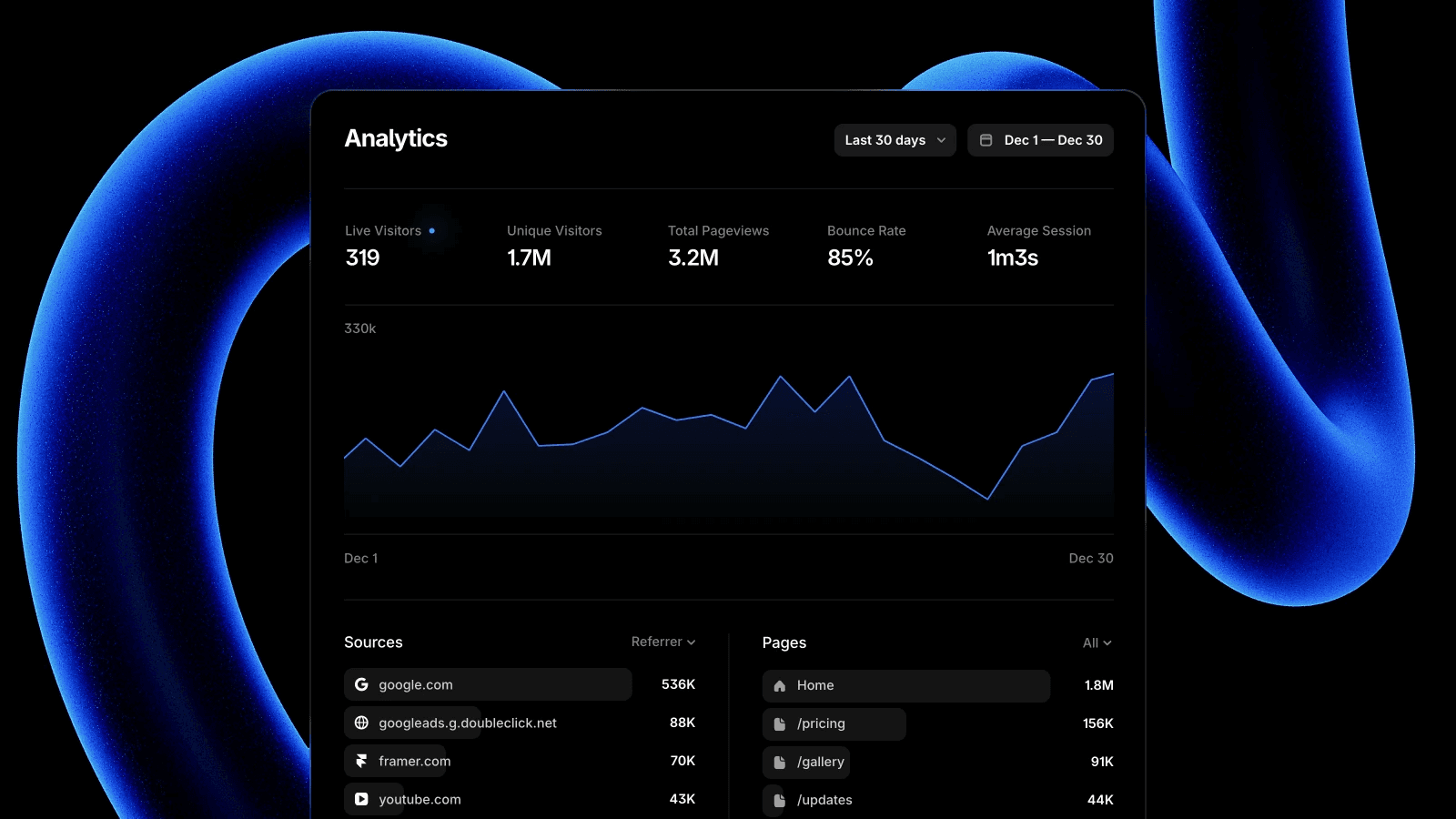
Framer automatically collects standard website metrics after a site is published.
These include:
live and unique visitors
total page views
bounce rate
average session duration
traffic sources
UTM tags
entry and exit pages
devices, browsers, and countries
The amount of historical data available depends on the plan. Framer currently provides up to 30 days on Basic, up to 90 days on Pro and Scale, and a longer history on Enterprise.
For conversion analysis, teams can also track:
specific link clicks
native form submissions
page visits
custom events
multi-step funnels
A/B test conversions
Funnels and A/B testing are part of the Convert add-on, which is available for sites on Pro, Scale, and Enterprise plans. Billing is based on analytics events, including page views, tracked clicks, and tracked form submissions.
Click and Form Tracking
Framer lets you attach a tracking ID to a link or native form.
For example:
homepage-book-demopricing-contact-salescase-study-ctaresource-downloaddemo-form-submit
Once the site is published, Framer records how often each event occurs. These tracking IDs can also become steps in a funnel or conversion goals in an A/B test.
Framer also supports custom events through code for interactions that go beyond standard links and forms. Tracking IDs for custom events must use lowercase words separated by hyphens.
This is useful for measuring known actions. It is different from a heatmap.
Framer can tell you how often a defined button was clicked. It does not show every place visitors clicked on the page or provide recordings of individual sessions.
A tool such as Hotjar may still be helpful when you need to see where visitors hesitate, scroll, click unexpectedly, or abandon a journey. Hotjar connects its funnels with heatmaps and session recordings, which provide more qualitative context around drop-off.
Framer can also capture standard UTM parameters and Google Ads click IDs through native form submissions on Scale and Enterprise plans. This can help marketing teams see which campaign generated a lead without manually adding hidden fields for the standard parameters.
Conversion Funnels
Funnels help you measure how visitors move through a defined website journey.
A simple demo funnel might be:
Homepage viewed → Product page viewed → Demo CTA clicked → Demo form submitted
A content-led funnel might be:
Article viewed → Related guide viewed → Resource downloaded → Contact page viewed
Each step can include page views, tracked link clicks, or form submissions. Framer then shows the conversion rate between the steps and how those results change over time.
Funnels can also be filtered by dimensions such as device type or country. This can reveal whether mobile visitors behave differently from desktop visitors or whether a particular market converts at a different rate.
The setup is approachable, but the funnel still needs a clear purpose.
Start with one important business journey rather than tracking every available interaction. For most B2B websites, that might be:
landing page to demo request
pricing page to contact sales
case study to inquiry
article to resource download
A smaller, well-defined funnel is usually easier to interpret than a long chain of loosely related page views.
Native A/B Testing
Framer’s A/B testing lets teams compare page variations without adding an external experimentation script.
A test starts with an existing page. Framer creates another version that can be edited independently, and a test can include up to five variants.
The conversion goal can be:
a tracked link click
a form submission
a visit to another page
Framer distributes traffic across the variants and reports the probability that one variation will perform best. Tests update in real time and run without visible flickering or layout shifts.
Useful B2B tests might include:
a shorter versus more detailed hero
different primary CTA wording
customer proof above versus below the fold
a short form versus a longer qualification form
different pricing-page structures
a case study placed earlier in the buyer journey
A/B testing works best on pages with enough traffic and one clear conversion goal. Low-traffic B2B sites may need to run tests for longer, and some results will remain inconclusive.
Choose questions that could influence a real marketing or sales outcome. Minor visual preferences rarely justify the time needed to gather reliable data.
What Framer 3.0 Adds to the Workflow
Using Agents to Explore Website Performance
Framer Agents can access site analytics and answer performance questions in conversational language.
A marketer might ask:
Which pages received the most traffic this month?
Where are visitors leaving our main conversion path?
Which articles are bringing visitors into the site?
How is the pricing page performing on mobile?
Which pages have high traffic but weak conversion?
Framer describes Agents as able to review traffic, drop-offs, search intent, and conversion gaps, then help refine the site directly on the canvas.
This makes analytics easier to access, especially for people who do not want to build a new dashboard every time they have a question.
The answers still require judgment.
A high bounce rate may indicate poor messaging, but it could also mean visitors quickly found the information they needed. A low CTA rate may suggest weak copy, the wrong audience, or an untracked conversion path.
Agents can surface patterns and help make changes. The marketing team still needs to decide what those patterns mean.
Using Branching Before Publishing Changes
Branching gives teams a separate place to explore website updates before they reach production. Read our guide about branching and publishing workflow.
A practical optimization workflow could look like this:
Analytics finding
→ Clear hypothesis
→ Explore the change in a branch
→ Review with the team
→ Launch an A/B test
→ Publish the stronger version
Branching and A/B testing solve different problems.
Branching supports internal exploration and review. A/B testing measures how published variations perform with real visitors.
Used together, they give marketing teams a more controlled way to move from an insight to a live website improvement. Framer introduced Branching specifically to help teams explore ideas before they go live.
Where Framer Fits in the Analytics Stack
Framer Analytics is strongest when the questions are closely connected to the public marketing website.
It can work well for:
website traffic reporting
campaign landing-page performance
CTA and form tracking
short conversion funnels
page-level experimentation
regular website optimization
Other tools remain useful for different questions.
GA4 offers broader acquisition reporting and more configurable journey analysis. Google also supports lead-generation events that connect online and offline steps in a B2B sales funnel. Read more about how to choose between GA4 vs. Framer here.
Hotjar adds visual heatmaps and session recordings, which can help explain why visitors become confused or leave a page.
Mixpanel and Amplitude are better suited to detailed event analysis inside products, including multi-step product funnels, user flows, cohorts, and retention over time.
A reasonable setup for a B2B company might be:
Framer for native website analytics and experiments
GA4 for acquisition and campaign reporting
Hotjar for occasional qualitative research
Mixpanel or Amplitude for the logged-in product
The right combination depends on the length of the buying journey and the questions the team needs to answer.
Privacy and Measurement Limitations
Framer’s native analytics is cookie-free and does not track IP addresses. Framer describes the system as GDPR- and CCPA-compliant by default.
That does not make the entire website automatically compliant.
A Framer site may still use GA4, advertising pixels, CRM embeds, chat tools, videos, or other third-party scripts that set cookies or process visitor data. Those tools should be reviewed separately.
The cookie-free model also affects measurement.
Framer’s anonymous identifier resets daily. For A/B testing, this means conversions are currently measured within the same day rather than across a longer B2B buying journey. A visitor who reads an article on Monday and submits a demo form the following week may not be connected as the same person.
For a short journey such as landing page → CTA → form submission, this may be sufficient.
For multi-touch attribution, account-level tracking, long sales cycles, or logged-in product behaviour, additional analytics tools will usually be needed.
A Practical Optimization Process
A useful optimization loop can stay simple:
Choose a high-value page or conversion journey.
Review traffic, tracked events, and funnel drop-off.
Form one clear hypothesis.
Explore the proposed change in a branch.
Define the conversion event.
Launch the A/B test.
Wait for enough data to reach a useful conclusion.
Publish the stronger version or record an inconclusive result.
Use what you learned to choose the next improvement.
Avoid changing a variant while a test is running. Framer recommends stopping the existing test and creating a new one when the variation itself needs to change, since editing it midway can make the results difficult to interpret.
Final Thoughts
Framer Analytics now covers a useful part of the B2B website optimization workflow.
Marketing and design teams can track important actions, build conversion funnels, and run page experiments without waiting for engineering to implement a separate testing system.
Framer 3.0 makes that workflow more connected. Agents help teams explore performance questions, while Branching creates a safer way to develop and review improvements.
The strongest fit is a public-facing marketing website with:
clearly defined conversion paths
enough traffic to support testing
relatively short website journeys
a team that wants to manage optimization inside Framer
Framer will not replace every analytics platform. For many B2B teams, it may cover enough of the day-to-day website questions to make regular optimization much easier.
The useful test is whether the data helps your team make the next website decision with more confidence.
Want to Make Better Use of Your Framer Website?
Framer gives marketing teams more ways to understand and improve website performance, but the setup still matters.
Clear tracking IDs, useful funnels, well-chosen experiments, and a maintainable website system make the data much easier to act on.
At New Lemon Studio, we help B2B marketing teams design, build, and improve Framer websites that are easier to operate after launch. Our partner also brings previous product analytics experience from Dropbox, helping us provide more informed, tailored advice for your team.
Need help setting up the right website structure, conversion paths, analytics, or experimentation workflow? Get in touch and tell us what your team is trying to improve.
Framer Analytics FAQs
Does Framer have built-in analytics?
Yes. Framer tracks traffic, page views, bounce rate, session duration, traffic sources, devices, countries, and UTM data.
You can also track specific clicks, form submissions, and custom events.
Does Framer support A/B testing?
Yes. Framer supports native page-level A/B testing through the Convert add-on.
You can test different page versions and measure results using a tracked click, form submission, or destination page as the conversion goal.
Can Framer build conversion funnels?
Yes. Funnels can combine page views, tracked clicks, and form submissions.
For example:
Homepage → Product page → Demo CTA → Form submission
The most useful funnels usually focus on one clear visitor journey rather than trying to track every website interaction.
Does Framer Analytics replace Google Analytics?
Not completely.
Framer is useful for website traffic, conversion paths, and page experiments. GA4 is still stronger for broader acquisition reporting, campaign analysis, and more configurable event reporting. Many teams may choose to use both. Read this article about how to choose between GA4 and Framer native analytics.
Does Framer provide heatmaps or session recordings?
No. Framer can track defined clicks and form submissions, but it does not provide Hotjar-style heatmaps or recordings of individual sessions.
Is Framer Analytics GDPR compliant?
Framer’s native analytics is cookie-free and does not track IP addresses.
However, your website may still use tools such as GA4, advertising pixels, CRM embeds, chat tools, or video platforms that require their own privacy and consent review.
Read more about Framer analytics in their official doc.
Is Framer A/B testing suitable for low-traffic B2B websites?
It can be, but tests may take longer to produce a useful result.
Low-traffic teams should focus on larger, meaningful changes tied to a clear conversion goal rather than small visual details.
Can Framer track long B2B buying journeys?
Only to a limited extent.
Framer’s anonymous identifier resets daily, so it may not connect a visitor who reads an article one day and submits a form several days later.
Teams that need long-term visitor journeys, account-level tracking, or multi-touch attribution will need additional tools.
More insights


