Integration
How to Integrate Hotjar with Framer
Understand visitor behaviour, identify conversion barriers, and improve your Framer website with session recordings, heatmaps, and user feedback.Understand visitor behaviour, identify conversion barriers, and improve your Framer website with session recordings, heatmaps, and user feedback.
By
Alex Ran
·
6
min read
·
Last updated:
Key takeaways
Hotjar adds behavioural insights to Framer websites through heatmaps, session recordings, and feedback tools.
Use Hotjar alongside Framer Analytics or GA4 to understand both website performance and visitor behaviour.
Define what you want to learn before collecting user data.
Track important pages first instead of recording every page by default.
Review performance, privacy, and consent requirements before enabling tracking.
The value of Hotjar comes from turning observations into website improvements.
Hotjar is a widely used web analytics tool that helps marketing teams understand visitor behaviour through session recordings. It also offers heatmaps, feedback widgets, and surveys.
For a B2B marketing website, this can help answer questions such as:
Are visitors engaging with the homepage content?
Do users notice important CTAs?
Where do visitors stop scrolling?
Which sections create confusion?
Why are visitors leaving before submitting a form?
Why Add Hotjar to Your Framer Website?
Framer already includes built-in analytics for traffic and performance insights. Adding Hotjar provides another layer of behavioural data, helping teams understand how visitors interact with important pages.
Framer Analytics and GA4 help answer questions such as where visitors come from, which pages they visit, and whether they complete important actions.
Hotjar adds context by showing how visitors experience those pages.
Heatmaps help teams understand which sections, buttons, and content areas receive attention. Session recordings allow marketers to review real browsing behaviour and identify friction points.
For B2B websites, this can be especially useful when improving homepage messaging, campaign landing pages, product pages, case studies, and conversion paths.
Connecting Hotjar with Framer is relatively simple. The more important work is deciding what questions you want to answer and how your team will turn those insights into improvements.
How to Connect Hotjar with Framer
The integration process usually involves adding Hotjar’s tracking code to your Framer website.
1. Create a Hotjar Site
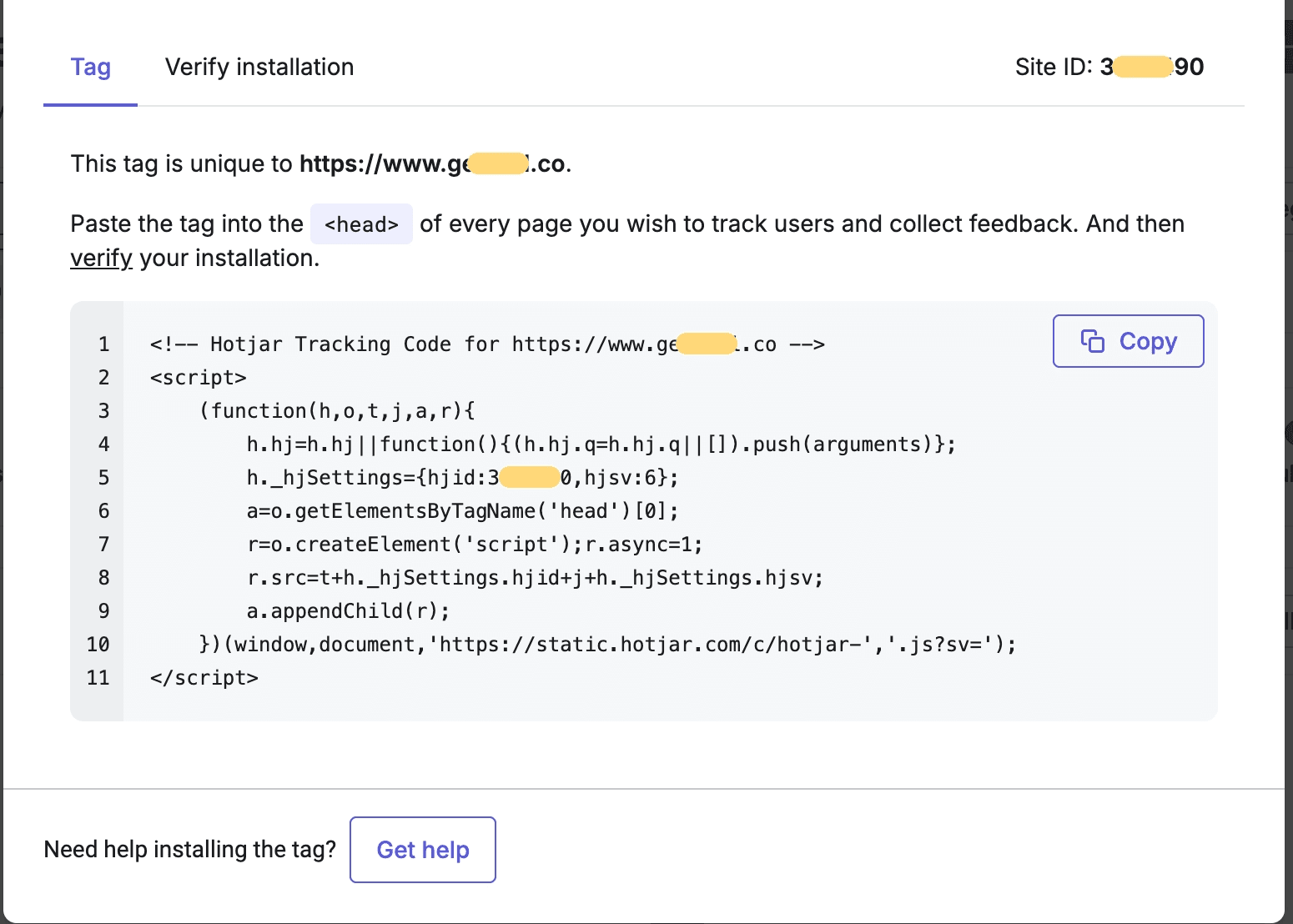
Create a Hotjar account and add your website.
During setup, Hotjar will ask for your website URL and generate a unique tracking code.
This code connects your Framer website with your Hotjar workspace.
2. Add the Hotjar Tracking Code to Framer
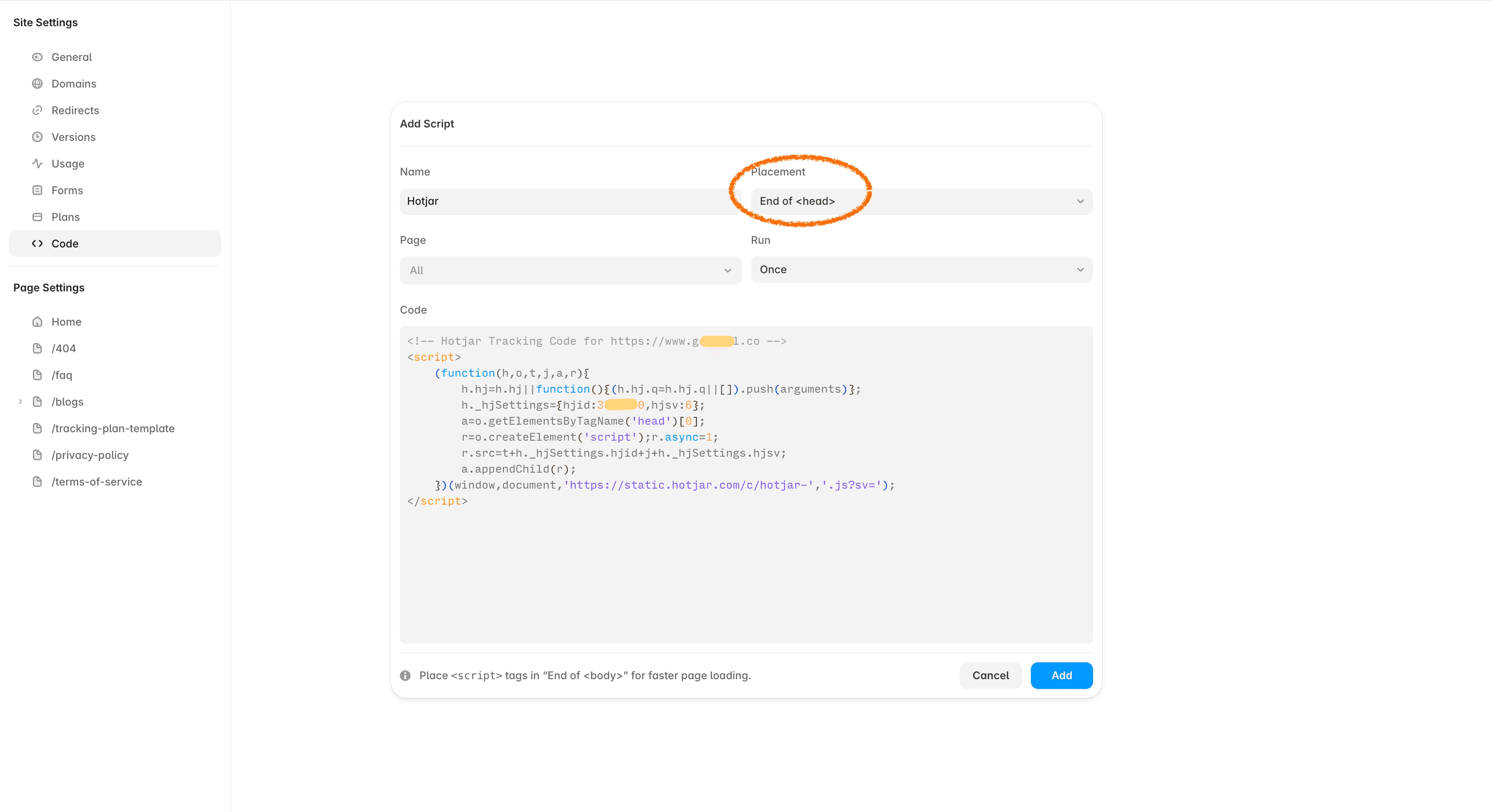
In your Framer project:
Open Site Settings
Go to Code
Add a new script and paste the Hotjar tracking script into the Code area.
Choose to load it in the Head section
Save and publish your website
Framer allows third-party scripts to be added through custom code, which is commonly used for analytics, tracking, and marketing tools.
3. Verify the Installation
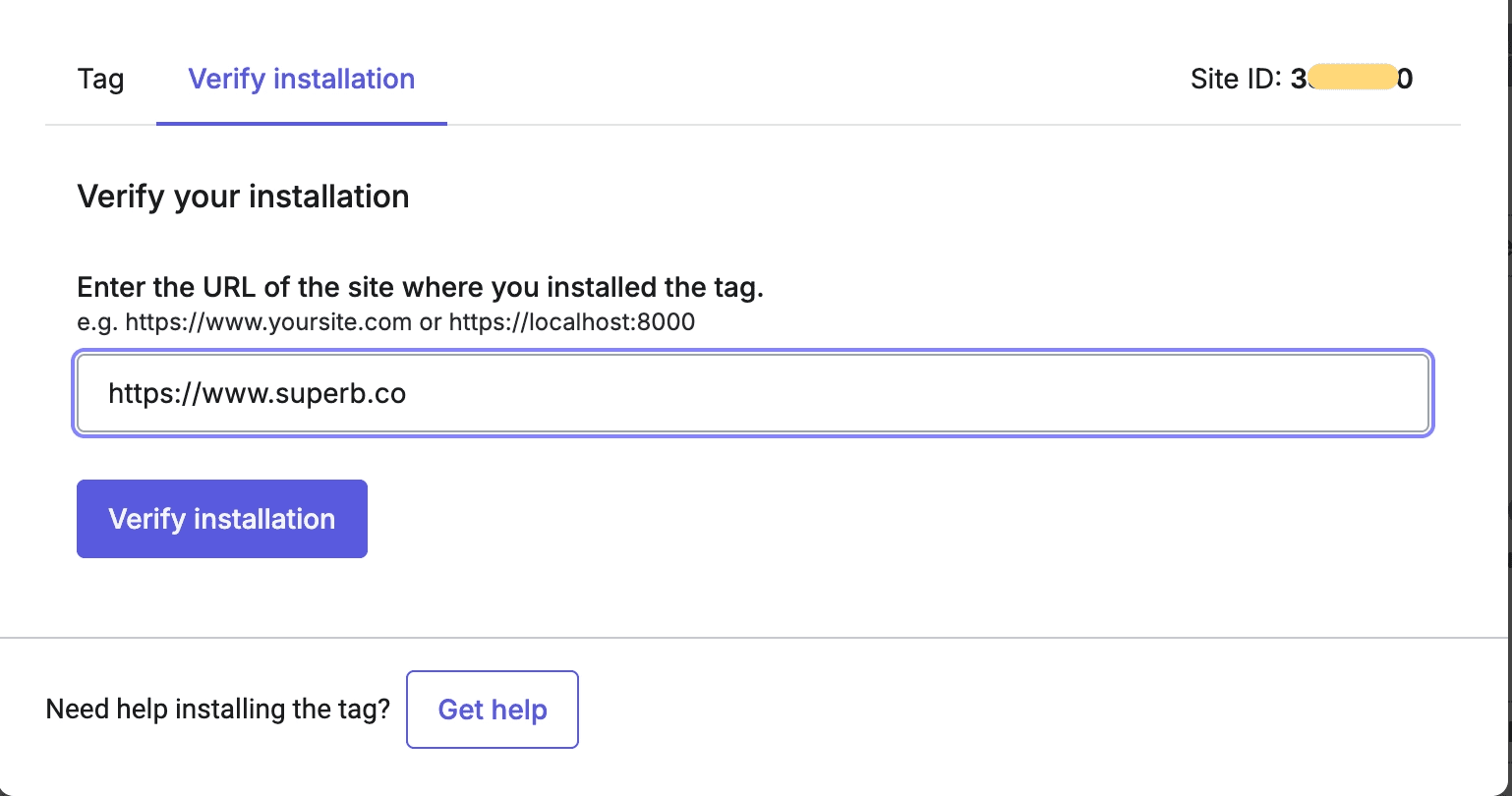
After publishing:
Open your live website
Visit several pages
Return to Hotjar
Confirm that data is being received
Hotjar may take some time before recordings and heatmaps appear.
For a new installation, it is useful to collect enough visitor activity before drawing conclusions from the data.
Risks to Consider Before Integrating Hotjar with Framer
Hotjar is easy to add to Framer, but consider these points as part of your plan.
Session recordings can affect performance
Session recordings add tracking scripts to your website.
If your team is not actively reviewing recordings, consider disabling them and only using the Hotjar features you need, such as heatmaps or feedback tools.
Be careful with sensitive content
Review which pages Hotjar should track, especially pages with:
personal information forms
customer portals
sensitive content
When setting up tracking in Framer, we suggest installing Hotjar only on your homepage or specific campaign landing pages instead of enabling it across every page, unless there is a clear reason to do so. You can also use Hotjar’s privacy controls to mask or exclude information where needed, but it is usually better to avoid collecting sensitive information in the first place.
Review privacy and consent requirements
Check that Hotjar fits your existing:
cookie consent setup
privacy policy
regional compliance requirements
Plan this during implementation rather than adding it after launch.
Tips When Integrating Hotjar with Framer
Define what you want to learn first
Hotjar can generate a large amount of behavioural data. Start with a specific question rather than collecting recordings without a purpose.
For example:
Are visitors understanding our homepage message?
Are people reaching our demo CTA?
Are users dropping off on a key landing page?
Then choose the Hotjar feature that helps answer that question.
Focus on important pages, be aware of the tradeoffs
You do not need to record every page. We recommend recording sessions only for your homepage or active campaign pages. Always consider the impact on website performance and privacy requirements when planning data collection.
Consider privacy and consent requirements
Hotjar collects user behaviour data, so teams should review their privacy setup before enabling tracking.
Depending on your audience location and company requirements, you may need:
cookie consent management
updated privacy policy wording
specific tracking settings
Review how Hotjar fits with your existing analytics and consent tools before launch.
Avoid tracking without a plan
Treat Hotjar insights as inputs for website improvements. Your team needs enough time to review the data and turn observations into actions.
visitor data → [⭐️needs effort] digest data → observations → [⭐️needs effort] plan changes → improvement plan → [⭐️needs effort] execute plan → marketing results
The value comes from acting on insights from the data, for example:
update unclear messaging
improve CTA placement
simplify navigation
remove unnecessary friction
test new page structures
Need Help Setting Up Analytics Tools for Your Framer Website?
Connecting Hotjar with Framer is technically straightforward. Building a measurement setup that supports real marketing decisions requires more planning.
At New Lemon Studio, we bring a decade of experience working with data and analytics and apply that knowledge to Framer website projects. We help B2B marketing teams build Framer websites with the right analytics, integrations, conversion paths, and content systems.
Planning a new Framer website or improving an existing setup? Tell us what your team is trying to understand or improve, and we’ll help you think through the right approach.
FAQs
What is Hotjar?
Hotjar is a website behaviour analytics tool that helps teams understand how visitors interact with a website through heatmaps, session recordings, surveys, and feedback tools.
Can I integrate Hotjar with Framer?
Yes. You can integrate Hotjar with Framer by adding Hotjar’s tracking script through Framer’s custom code settings.
After publishing the website, Hotjar can start collecting visitor behaviour data.
How do I add Hotjar to a Framer website?
To add Hotjar to Framer:
Create a Hotjar site and copy the tracking code.
Open your Framer project.
Add the script under Site Settings → Custom Code.
Publish the website.
Verify that Hotjar is receiving data.
Should I use Hotjar or GA4 with Framer?
They answer different questions.
GA4 helps understand traffic sources, campaigns, conversions, and user journeys.
Hotjar helps understand how visitors interact with pages through recordings, heatmaps, and feedback.
Many marketing teams use both together.
Does Hotjar slow down a Framer website?
Hotjar adds additional tracking scripts, which can affect website performance.
If your team is not actively reviewing session recordings, consider disabling them or only enabling the Hotjar features you currently need.
What pages should I track with Hotjar?
For B2B websites, start with high-impact pages such as:
homepage
product or service pages
pricing pages
campaign landing pages
contact or demo pages
These pages usually provide the most useful insights for improving conversions.
Is Hotjar GDPR compliant?
Hotjar provides privacy controls, but teams are responsible for configuring the tool correctly for their audience and requirements.
Before launch, review your cookie consent setup, privacy policy, and what information is collected through recordings.
Can Hotjar replace Google Analytics?
No.
Hotjar and Google Analytics serve different purposes.
Google Analytics focuses on quantitative data such as traffic sources and conversions. Hotjar provides qualitative insights into visitor behaviour and page interactions.
More insights


